Saving a network to a file
Save a cityseer prepared networkx graph to a file.
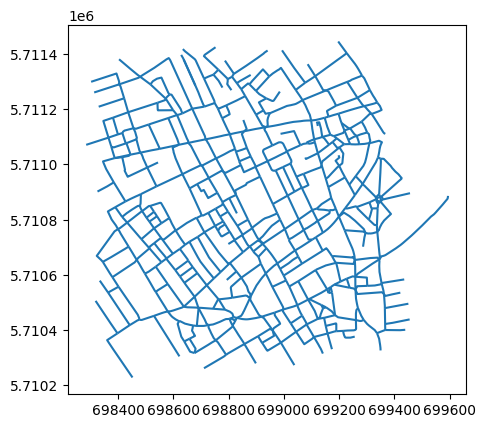
To save a graph or to visualise it from QGIS, convert it to a GeoDataFrame and save it using geopandas.
First, let’s create a simple OSM graph from a bounding box, using the same approach as before.
from shapely import geometryfrom cityseer.tools import io= geometry.box(- 0.14115725966109327 ,51.509220662095714 ,- 0.12676440185383622 ,51.51820111033659 ,= io.osm_graph_from_poly(poly_wgs)print (G)
INFO:cityseer.tools.graphs:Generating interpolated edge geometries.
WARNING:cityseer.tools.util:The to_crs_code parameter 4326 is not a projected CRS
INFO:cityseer.tools.io:Converting networkX graph to CRS code 32630.
WARNING:cityseer.tools.util:The to_crs_code parameter 4326 is not a projected CRS
INFO:cityseer.tools.io:Processing node x, y coordinates.
INFO:cityseer.tools.io:Processing edge geom coordinates, if present.
INFO:cityseer.tools.graphs:Removing filler nodes.
INFO:cityseer.tools.util:Creating edges STR tree.
INFO:cityseer.tools.graphs:Removing filler nodes.
INFO:cityseer.tools.graphs:Removing dangling nodes.
INFO:cityseer.tools.graphs:Removing filler nodes.
INFO:cityseer.tools.util:Creating edges STR tree.
INFO:cityseer.tools.graphs:Splitting opposing edges.
INFO:cityseer.tools.graphs:Squashing opposing nodes
INFO:cityseer.tools.graphs:Merging parallel edges within buffer of 25.
INFO:cityseer.tools.util:Creating edges STR tree.
INFO:cityseer.tools.graphs:Splitting opposing edges.
INFO:cityseer.tools.graphs:Squashing opposing nodes
INFO:cityseer.tools.graphs:Merging parallel edges within buffer of 25.
INFO:cityseer.tools.util:Creating edges STR tree.
INFO:cityseer.tools.graphs:Splitting opposing edges.
INFO:cityseer.tools.graphs:Squashing opposing nodes
INFO:cityseer.tools.graphs:Merging parallel edges within buffer of 25.
INFO:cityseer.tools.util:Creating edges STR tree.
INFO:cityseer.tools.graphs:Splitting opposing edges.
INFO:cityseer.tools.graphs:Squashing opposing nodes
INFO:cityseer.tools.graphs:Merging parallel edges within buffer of 25.
INFO:cityseer.tools.util:Creating nodes STR tree
INFO:cityseer.tools.graphs:Consolidating nodes.
INFO:cityseer.tools.graphs:Merging parallel edges within buffer of 25.
INFO:cityseer.tools.graphs:Removing filler nodes.
INFO:cityseer.tools.util:Creating nodes STR tree
INFO:cityseer.tools.graphs:Consolidating nodes.
INFO:cityseer.tools.graphs:Merging parallel edges within buffer of 25.
INFO:cityseer.tools.graphs:Removing filler nodes.
INFO:cityseer.tools.util:Creating nodes STR tree
INFO:cityseer.tools.graphs:Consolidating nodes.
INFO:cityseer.tools.graphs:Merging parallel edges within buffer of 25.
INFO:cityseer.tools.graphs:Removing filler nodes.
INFO:cityseer.tools.util:Creating nodes STR tree
INFO:cityseer.tools.graphs:Consolidating nodes.
INFO:cityseer.tools.graphs:Merging parallel edges within buffer of 25.
INFO:cityseer.tools.graphs:Removing filler nodes.
INFO:cityseer.tools.util:Creating nodes STR tree
INFO:cityseer.tools.util:Creating edges STR tree.
INFO:cityseer.tools.graphs:Snapping gapped endings.
INFO:cityseer.tools.util:Creating edges STR tree.
INFO:cityseer.tools.graphs:Splitting opposing edges.
INFO:cityseer.tools.graphs:Merging parallel edges within buffer of 25.
INFO:cityseer.tools.graphs:Removing dangling nodes.
INFO:cityseer.tools.graphs:Removing filler nodes.
INFO:cityseer.tools.util:Creating edges STR tree.
INFO:cityseer.tools.graphs:Splitting opposing edges.
INFO:cityseer.tools.graphs:Squashing opposing nodes
INFO:cityseer.tools.graphs:Merging parallel edges within buffer of 25.
INFO:cityseer.tools.util:Creating nodes STR tree
INFO:cityseer.tools.graphs:Consolidating nodes.
INFO:cityseer.tools.graphs:Merging parallel edges within buffer of 25.
INFO:cityseer.tools.util:Creating edges STR tree.
INFO:cityseer.tools.graphs:Splitting opposing edges.
INFO:cityseer.tools.graphs:Squashing opposing nodes
INFO:cityseer.tools.graphs:Merging parallel edges within buffer of 25.
INFO:cityseer.tools.util:Creating nodes STR tree
INFO:cityseer.tools.graphs:Consolidating nodes.
INFO:cityseer.tools.graphs:Merging parallel edges within buffer of 25.
INFO:cityseer.tools.graphs:Removing filler nodes.
INFO:cityseer.tools.graphs:Merging parallel edges within buffer of 50.
INFO:cityseer.tools.graphs:Ironing edges.
INFO:cityseer.tools.graphs:Merging parallel edges within buffer of 1.
INFO:cityseer.tools.graphs:Removing dangling nodes.
INFO:cityseer.tools.graphs:Removing filler nodes.
MultiGraph with 382 nodes and 587 edges
Use the geopandas_from_nxnetworkx dataset into a geopandas LineString GeoDataFrame.
= io.geopandas_from_nx(G)
INFO:cityseer.tools.io:Preparing node and edge arrays from networkX graph.
0
[beak street]
[]
[unclassified]
[0]
False
False
LINESTRING (698573.946 5710658.889, 698597.952...
108070
25473512
0
1
[beak street]
[]
[unclassified]
[0]
False
False
LINESTRING (698573.946 5710658.889, 698556.667...
108070
25473371
0
2
[kingly court]
[]
[pedestrian, footway]
[0]
True
False
LINESTRING (698573.946 5710658.889, 698573.05 ...
108070
5568839679
0
3
[upper john street]
[]
[unclassified]
[0]
False
False
LINESTRING (698607.761 5710618.003, 698575.964...
108070
25473|26169±12909|95675
0
4
[great marlborough street]
[]
[tertiary]
[0]
False
False
LINESTRING (698482.48 5710892.514, 698538.717 ...
9791491
21665965
0
Since this is now a geopandas GeoDataFrame, you can use it accordingly.
geopandas can now be used to save the file to disk, it can then be accessed and edited from an application such as QGIS.
"temp/save_streets_demo.gpkg" ,= "GPKG" ,
INFO:pyogrio._io:Created 587 records
Conclusion
This notebook demonstrated how to convert a cityseer-prepared networkx graph into a geopandas GeoDataFrame using geopandas_from_nx, and then save it to disk as a GeoPackage file. This workflow is useful for exporting networks for inspection in GIS applications such as QGIS or for sharing datasets with collaborators.
Next steps: For analysis, see Network Centrality or Accessibility .